All products Decision layer Data collection Trip Counting Module
Active safety and control
Engine and thermal management

MetaFMS Fleet management software and operations panel

The whole fleet on one screen.

Fleet management software that brings field data to decision makers

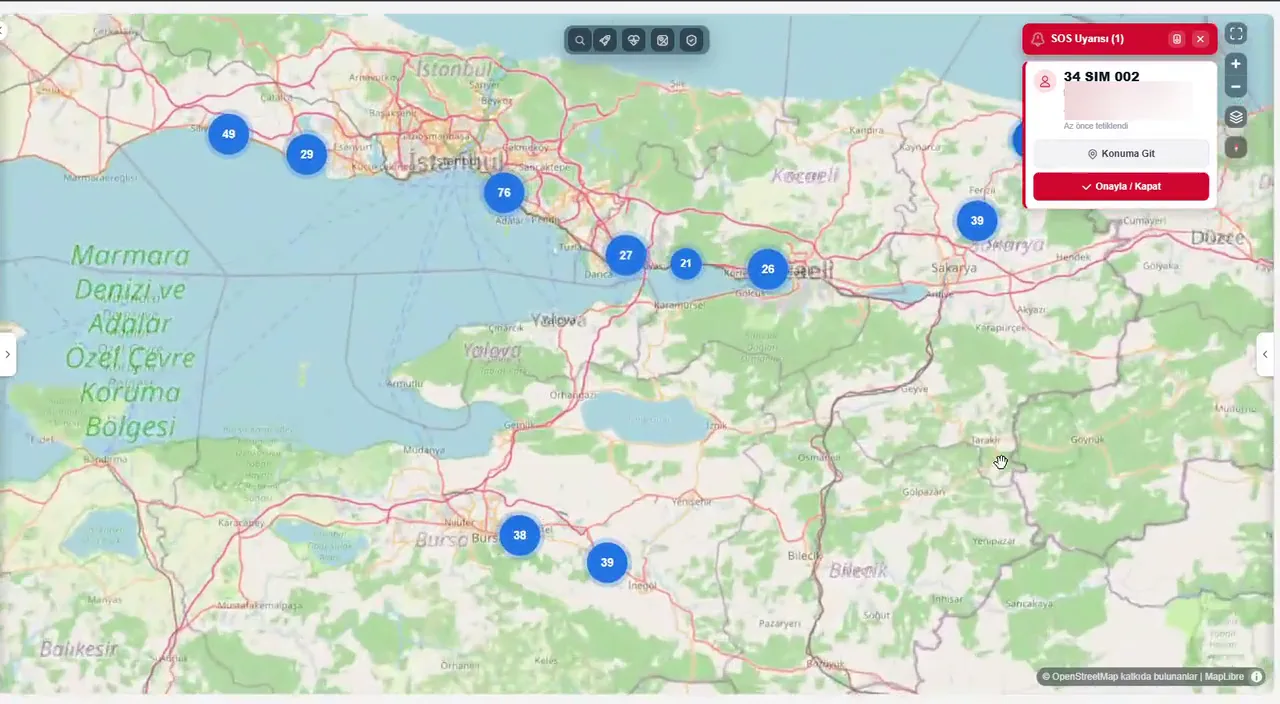
01 Live fleet map

4Products feeding one panel
CANRPM, temperature, fuel and AdBlue on a timeline
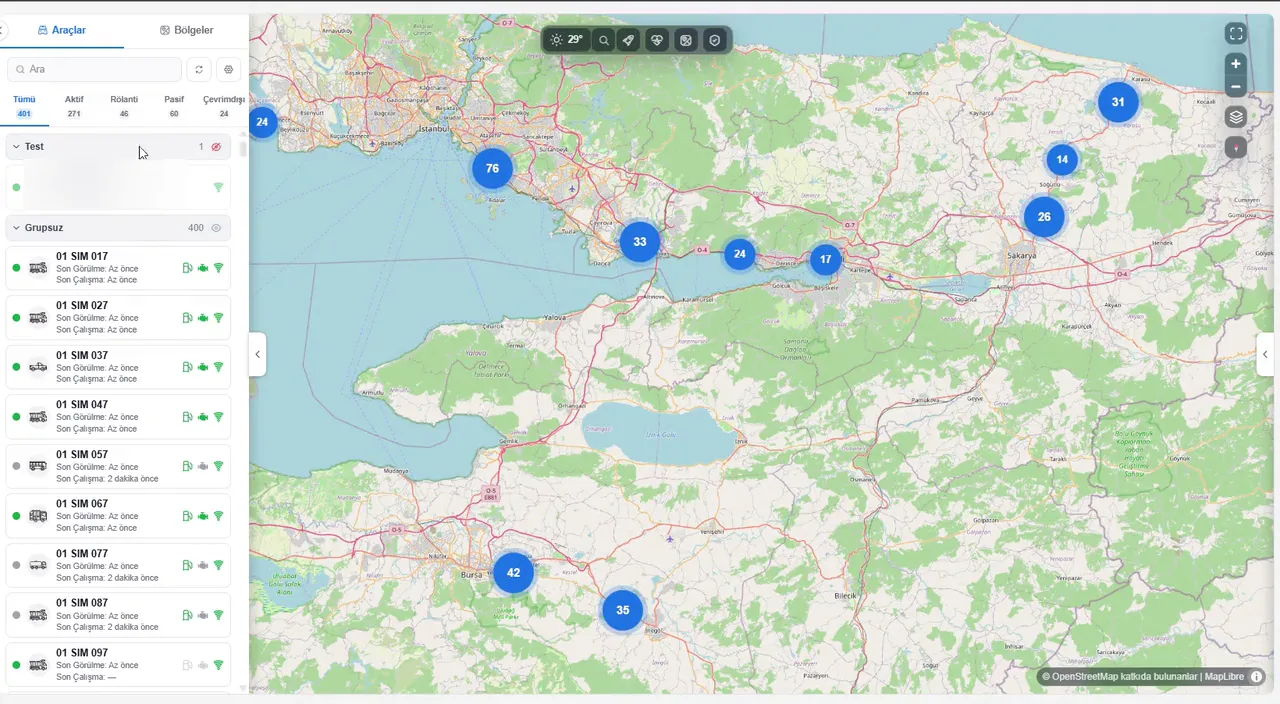
DMSLive driver-event feed beside the map
48 hSilent vehicles flagged ‘needs attention’

Knowing the location is not managing the operation

Most fleets know where their vehicles are, not what they are doing. Engine, fuel, driver and tipper data is produced on the vehicle but does not reach the office. Managers run the site by phone and hear about events after the fact.

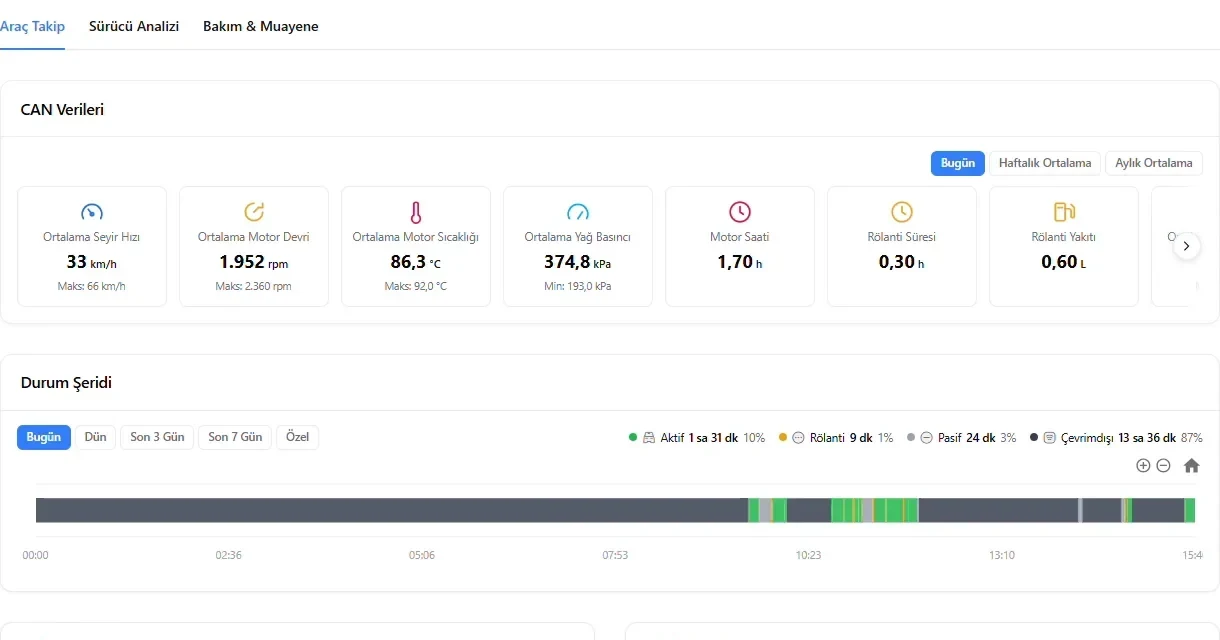
CAN data on the vehicle page: average speed, engine speed, engine temperature, oil pressure, engine hours and idling, with the day’s status strip below

Vehicle data, visible in the office

Fuel, engine hours, RPM, temperature, AdBlue and fault codes are all produced on the vehicle. When the office cannot see them, the source of idling stays hidden and faults are often noticed only once the vehicle has stopped.

In MetaFMSThe vehicle page shows average speed, engine speed, engine temperature, oil pressure, engine hours and idling as daily, weekly or monthly averages, with the day’s active, idling, parked and offline strip below. Selected CAN metrics can be followed on a time chart in the vehicle panel on the map.
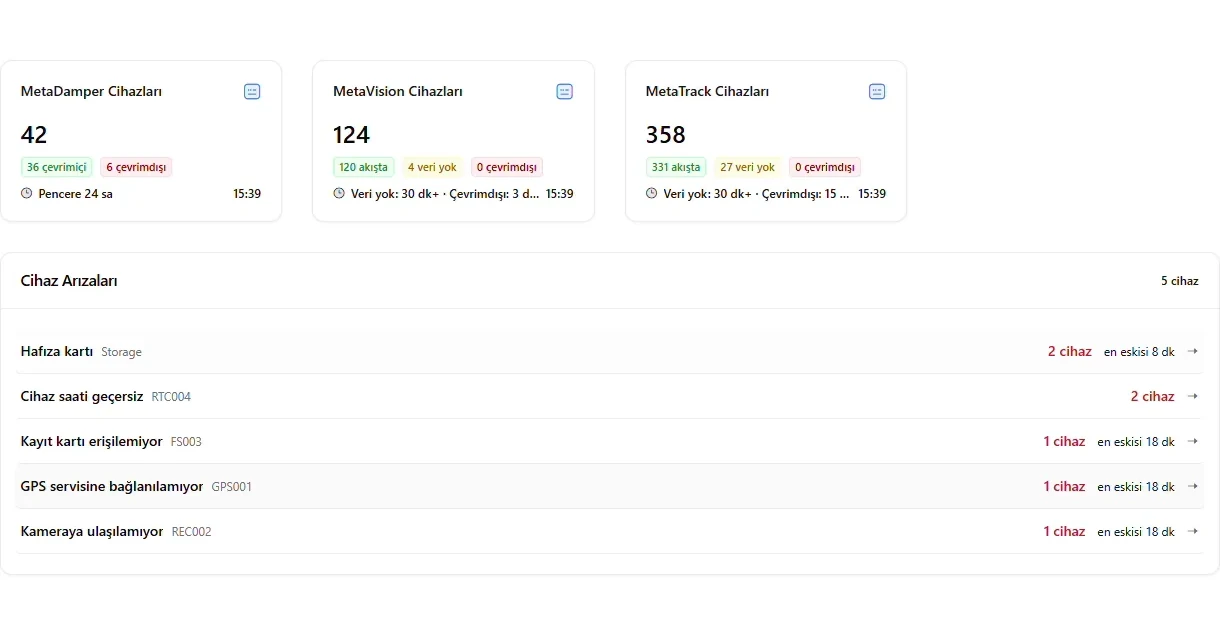
Overview with MetaDamper, MetaVision and MetaTrack device cards and the device fault list by code

Every device on one screen

When the tipper unit, the camera and vehicle tracking sit in separate systems, the data never comes together. Understanding a single event means checking several screens.

In MetaFMSMetaDamper, MetaVision and MetaTrack devices are counted with their connection status on the same overview, and their data meets in the same vehicle record. DMS events, speed violations, tipper saves and engine violations add up to a single risk score.

No more tracking on paper

When trips, checklists and working hours are written on paper or in a spreadsheet, records turn into estimates. No standard emerges and nothing can be checked afterwards.

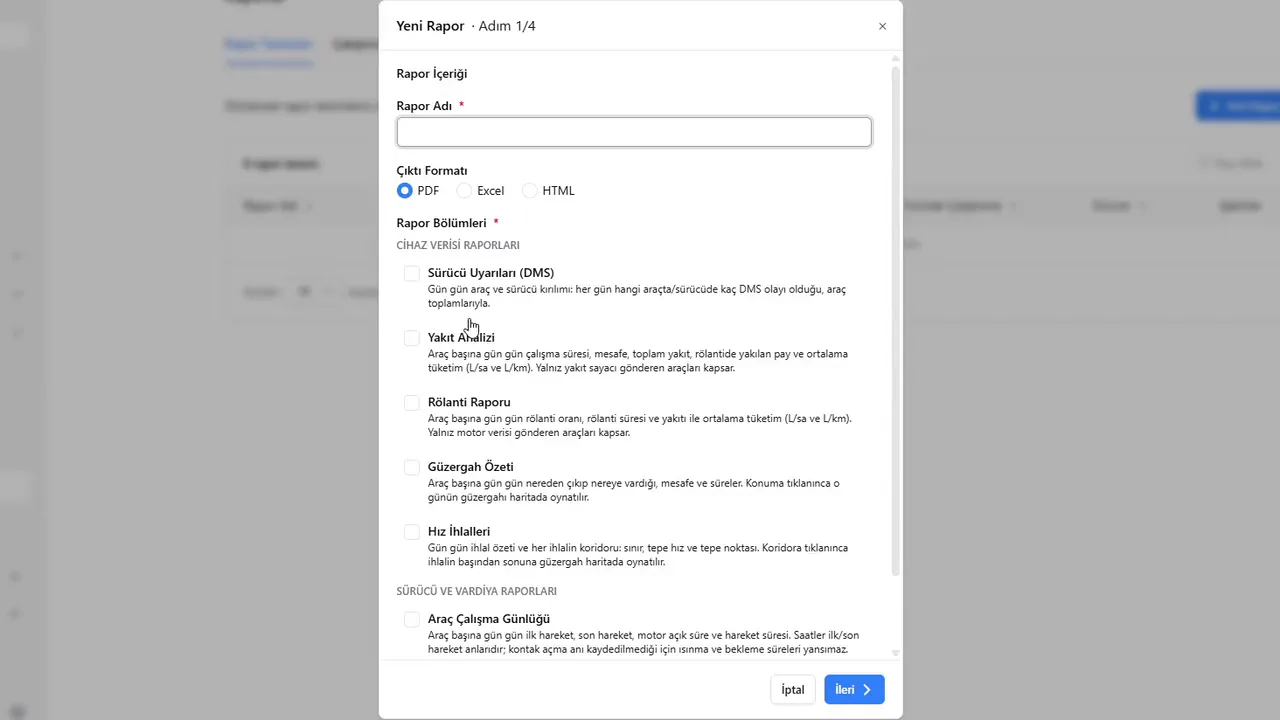
In MetaFMSThe vehicle work log, route summary, idling, fuel analysis and speeding are chosen as report sections, and the report is produced as PDF, Excel or HTML. Trips are counted automatically, checklists are filled in on the cab display and missing ones show on the panel.

Events reach the panel at once

A violation, a fault or an emergency stays on site and reaches the manager late, by phone. The moment to act has passed.

In MetaFMSViolations, faults and emergencies reach the panel as instant notifications, and one click on a driver’s emergency call goes to the vehicle’s position. If a camera is blocked or a vehicle sends no data for 48 hours, it goes on the ‘needs attention’ list.

From the field to a decision

MetaFMS is where the data meets. Devices measure and record on the vehicle; the panel brings the data together, reports on it and raises alarms. Safety devices make their decisions on the vehicle, without waiting for the panel.

  1. Measured on the vehicle

    MetaTrack reads location and CAN data, MetaVision monitors and records the driver, MetaDamper watches tilt and body movement, and the Trip Counting Module counts trips between the loading and dumping sites. When there is a risk, MetaDamper stops the body on the vehicle itself, with no need for an internet connection.

  2. Sent over 4G

    Data travels over the 4G mobile network. Outside coverage, MetaTrack and MetaVision keep records on the device and send them to the panel once the connection returns.

  3. Combined in MetaFMS

    Location, CAN data, driver events, video, tipper events and trips meet in the same vehicle record and become maps, reports and alarms.

  4. Reaches the decision makers

    Fleet managers, health and safety managers, site chiefs and senior management see the same data within their own access rights. Reports run daily, weekly, monthly or for a custom period.

From the live map to the period report, one panel

Every module works from the same vehicle record. What a module shows depends on which Metadiag devices are fitted to the vehicle.

Footage is from the MetaFMS test panel running on simulated data; driver names and address details have been blurred.

One day on the test panel

Figures from a 401-vehicle fleet running on simulated data in the MetaFMS test environment. Location, device, driver and tipper data appear together in one panel.

Vehicles in fleet status: 272 active, 45 idling, 60 parked, 24 offline
401
Devices from three products: 42 MetaDamper, 124 MetaVision, 358 MetaTrack
524
DMS events across 22 drivers; most often fatigue (26) and seat belt (24)
100
Tipper saves: 6 dangerous angle, 12 while moving, 3 tailgate not opened
21

Figures are from the MetaFMS test panel (26.08.2026, simulated data) and do not represent a real fleet.

How the vehicle risk score is calculated

DMS events (× 1.0)
0 × 1.0 = 0
Speed violations (× 2.0)
46 × 2.0 = 92
Tipper saves (× 3.0)
4 × 3.0 = 12
Engine violations (× 4.0)
9 × 4.0 = 36
Total risk score
140

Example: one vehicle’s figures for one day from the MetaFMS test panel, using simulated data. Fuel alerts are not included in the score. The score is also broken down by driver, and the vehicle and driver risk reports show where to focus training first.

Products that feed the panel

Metadiag MetaFMS is the decision layer of the product family: the data that devices measure and record on the vehicle comes together here. MetaDamper, MetaTrack, MetaVision and the Trip Counting Module feed the panel. MetaControl and MetaCooler make their decisions on the vehicle and are not shown in the panel.

MetaControl and MetaCooler work independently on the vehicle; they have no screens in the panel.

PDF fleet report

The generated PDF route report holds fleet totals and each vehicle's daily routes.

Who works with it

Fleet and operations managers

They start the day with fleet status and the vehicles that need attention, and compare the consumption and idling ranking vehicle by vehicle.

Health and safety managers

They see tipper saves and the DMS event breakdown by driver, and set training priorities from the vehicle risk score.

Site chiefs

They open a vehicle’s day on the map from the link in the report and replay its routes one by one.

Maintenance and workshop chiefs

They see engine temperature, oil pressure and engine speed limit alerts and device faults while the vehicle is still on the road.

Senior management

They set up a report definition once, and the PDF fleet report arrives at the scheduled time with an in-app notification.

Technical specifications

Platform

Type
Web-based fleet and operations management panel
Access
From a web browser, with an assigned user account
Data sources
MetaDamper (with the 4.3″ display package), MetaTrack, MetaVision, the Trip Counting Module
Data types
Location and speed, CAN/J1939 vehicle data, driver events and video, tipper events, trips and tonnage, checklists, device logs
Data transfer
4G; outside coverage, MetaTrack and MetaVision store records on the device and send them when the connection returns
Equipment types
Trucks, construction machinery and generators in the same list

Reporting and alarms

Report period
Daily, weekly, monthly, custom period; shift filter
Example reports
Weekly idling, zone events, daily tipper trips and tonnage, fuel consumption
Export
Reports can be exported
Alarm types
Violation, fault, emergency, lost connection
Needs attention
Vehicle that has sent no data for more than 48 hours

Users and access

Authorisation
Users at different permission levels; viewing limited to each user's permissions
Reports
Permission-based
Camera footage
Permission-based access

What each module shows depends on the Metadiag devices fitted to the vehicle and on the vehicle's CAN structure. MetaControl and MetaCooler work on the vehicle and are not shown in the panel.

Frequently asked questions

How do I access MetaFMS?

MetaFMS is a web-based fleet management platform: you sign in from a browser with the user account assigned to you. What you see depends on the permissions given to your account.

Which products show data in the panel?

MetaDamper, MetaTrack, MetaVision driver monitoring and the Trip Counting Module provide data for the panel. MetaDamper data reaches the panel with the 4.3″ display package; the CAN data available depends on the vehicle.

Does MetaFMS display data from every Metadiag product?

No. MetaControl automatic sheeting and MetaCooler electronic fan control both work independently on the vehicle and have no screens in MetaFMS.

What happens if the connection drops?

Safety devices such as MetaDamper decide on the vehicle, so protection does not depend on an internet connection. MetaTrack and MetaVision keep records on the device where there is no coverage and send them to the panel once the connection returns.

Can every user see everything?

No. Users are set up with different permission levels and see data within their own limits. Access to camera footage is also permission-based.

Which reports does MetaFMS fleet management software provide?

Reports cover zones, routes, fuel, idling, maintenance, driver events and tipper saves; available data depends on the devices fitted and user permissions. Select a daily, weekly, monthly or custom period, filter the fleet dashboard by shift and export reports.

Can different equipment types appear in one list?

Yes. The vehicle list shows different equipment types, such as trucks and excavators, together. MetaTrack vehicle tracking can be fitted to site equipment, including construction machinery and generators.

What is fleet management software, and what does MetaFMS combine?

Fleet management software lets managers review vehicle and operational data together. MetaFMS combines data from MetaDamper, MetaTrack, MetaVision and the Trip Counting Module in a web panel with a live map, alarms, permission-based reports, maintenance and device management.

MetaFMS processes personal data such as driver details, location and camera footage. Informing employees and establishing the legal basis for processing are the responsibility of the organisation operating the fleet; permission-based access supports that responsibility.

MetaFMS

Let's start with a few pilot vehicles in your fleet

We plan the survey, installation and reporting around your site. Our team reviews your vehicles and recommends the right configuration.

Products of interest